AICoder
A desktop control room for orchestrating parallel AI coding agents across isolated git worktrees, with focused review and shipping workflows.
Technologies Used
Categories
About This Project
AICoder — A Desktop Control Room for Parallel AI Coding Agents
AICoder is a desktop application for running, monitoring, reviewing, and shipping work produced by multiple AI coding agents.
Instead of managing several terminal windows, branches, agent conversations, and code reviews by hand, AICoder brings the entire workflow into one focused interface. It can run Claude Code and Codex sessions in parallel, isolate their changes with Git worktrees, surface sessions that need human attention, review completed work, and guide approved changes toward a pull request.
AICoder is designed for developers who want the speed of agent-assisted development without losing visibility, control, or confidence in the code being produced.
AICoder turns parallel AI coding from a collection of terminal sessions into a structured build, review, and shipping workflow.
Why AICoder Exists
Working with one AI coding agent is relatively straightforward. You give it a task, watch the output, review its changes, and decide what to keep.
The workflow becomes much harder when several agents are working at the same time.
Each agent may be:
- Editing a different part of the application
- Running tests or builds
- Waiting for clarification
- Producing changes on a separate branch
- Encountering an error
- Completing work that needs review
- Responding to feedback from an earlier review
- Preparing changes that are ready to commit or publish
At that point, the challenge is no longer simply generating code. The challenge is coordinating the work.
Developers need to know:
- Which agents are still running?
- Which sessions need a decision?
- Which changes passed their tests?
- Which branch contains a particular implementation?
- Did the agent introduce duplication or security risks?
- Is the work ready to merge?
- What should be fixed before opening a pull request?
AICoder provides a dedicated environment for answering those questions. It combines task planning, agent execution, Git isolation, live monitoring, automated reviews, testing, previews, and shipping controls in one desktop application.
A Structured Workflow for Agent-Assisted Development
AICoder treats AI coding as a workflow rather than a chat.
A typical task moves through several distinct stages:
- Define the work that needs to be completed.
- Choose an AI coding agent and model.
- Start the agent in an isolated Git worktree.
- Monitor its progress when necessary.
- Respond if the agent asks a question.
- Run tests and inspect the resulting diff.
- Review the implementation for quality, documentation, and security.
- Send review findings back to an agent when changes are needed.
- Approve the finished implementation.
- Commit, push, and open a pull request.
This structure makes the state of every task visible. It also keeps important decisions—such as approving code or publishing a branch—under human control.
Parallel Agents with Real Git Isolation
AICoder can run multiple coding sessions against the same repository at the same time.
Every coding session operates inside its own Git worktree. A worktree provides the agent with an isolated checkout and branch while still sharing the repository’s underlying Git history.
This approach delivers several important benefits:
- Agents can edit the same repository concurrently.
- One session cannot overwrite another session’s working files.
- Your primary checkout remains separate from agent-generated changes.
- Each implementation can be inspected independently.
- Failed experiments can be discarded without disturbing other work.
- Successful changes can be merged back through a controlled process.
AICoder stores its managed worktrees beneath the project’s .aicoder/worktrees/ directory. The isolation is based on real Git primitives rather than a simulated editing environment, so the resulting branches and commits remain compatible with normal development workflows.
The Attention Queue
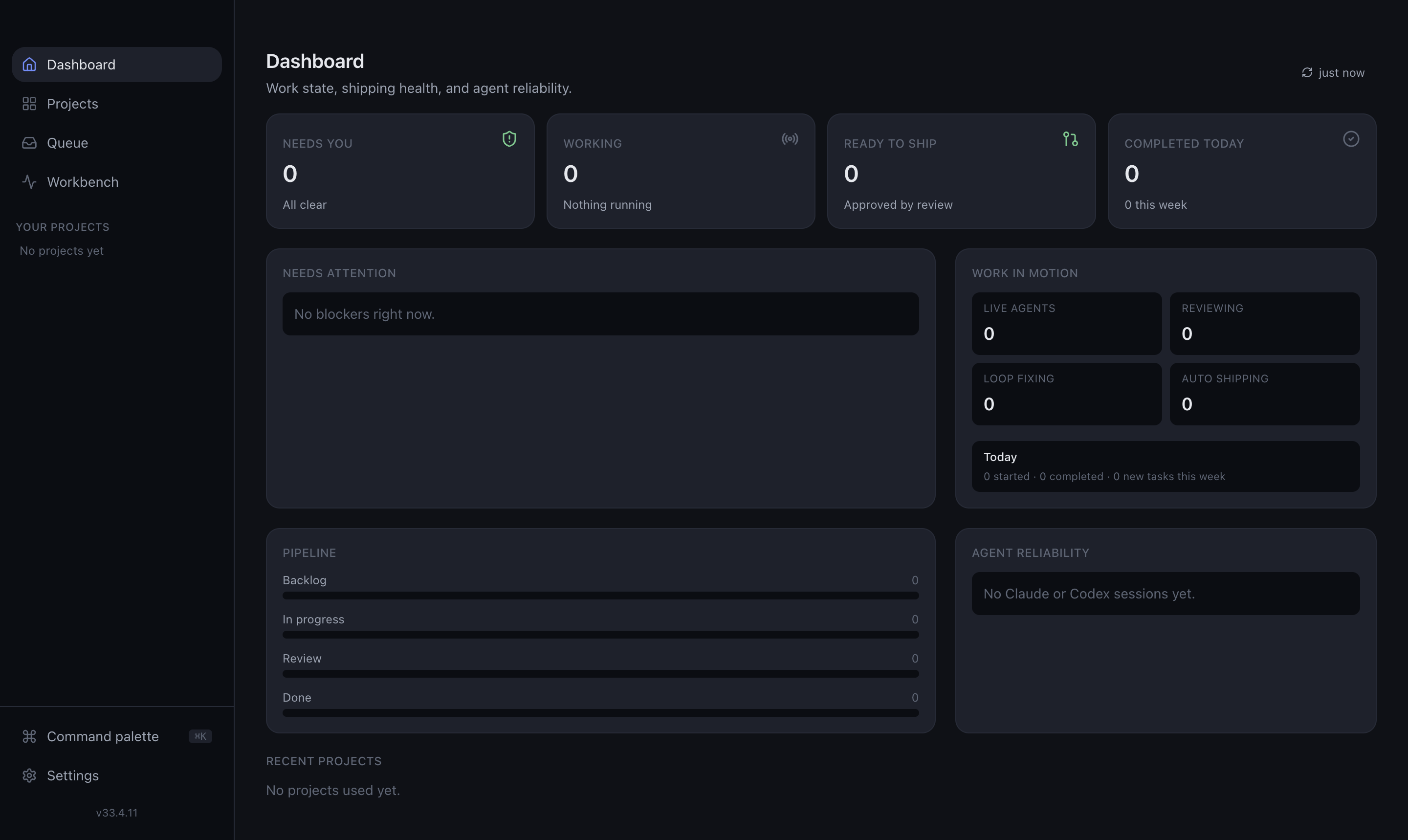
The Attention Queue is AICoder’s primary workspace.
Most orchestration tools emphasize activity: logs, tokens, terminal output, and constantly updating status panels. AICoder instead emphasizes decisions.
The Queue surfaces sessions that need human attention, including:
- An agent asking a question
- A session that failed or stopped unexpectedly
- Work that completed and is ready for review
- Review findings that need to be addressed
- Approved changes that are ready to save or publish
- Tasks waiting for a shipping decision
Sessions that are progressing normally stay out of the way. This lets developers supervise multiple agents without watching every line of terminal output.
The result is a decision-first inbox for AI development: quiet while work is progressing and specific when intervention is required.
The Agent Workbench
For times when closer supervision is useful, AICoder includes a live Workbench.
The Workbench provides a consolidated view of active coding sessions across projects. Depending on the state of a session, it can show:
- The selected project and task
- The agent currently performing the work
- Live session status
- Runtime information
- Todo or checklist progress
- Recent activity
- Terminal output
- Waiting questions
- Live code changes
- Controls for opening or stopping a session
This gives developers access to the detailed execution stream without making it the center of the everyday workflow.
You can step into the Workbench when a task needs investigation, then return to the Queue when you only need to handle outcomes.
Task Planning and Project Organization
AICoder organizes development around projects and tasks.
A software project is connected to a local Git repository. Within that project, work can be captured as tasks, prioritized, expanded with context, and moved through a planning board.
Tasks can include:
- Detailed implementation instructions
- Supporting context and documentation
- File attachments
- Agent and model preferences
- Review requirements
- Current execution status
- Branch and worktree information
- Shipping status
The board provides a planning view, while the Attention Queue provides the operational view. This separation keeps backlog management distinct from the immediate decisions created by running agents.
Split Large Tasks into Parallel Work
Some features are too large or too varied for a single uninterrupted agent session.
AICoder supports splitting work into focused subtasks that can be assigned to separate agents. Each subtask receives its own isolated branch and worktree, allowing several parts of a larger feature to progress concurrently.
This is useful for work such as:
- Implementing frontend and backend changes in parallel
- Separating application code from tests
- Assigning documentation to a dedicated session
- Investigating multiple possible solutions
- Dividing a migration into independent components
- Running a focused review alongside implementation work
Subtasks branch from the parent task and can later be merged back into it. This preserves a clear relationship between the overall objective and the individual implementations.
Use Claude Code and Codex
AICoder drives the AI coding command-line tools installed on your computer.
Supported coding workflows include:
- Claude Code
- OpenAI Codex
The application launches the real CLI rather than reproducing the coding agent inside a proprietary editor. This allows developers to continue using their existing CLI configuration, authentication, and subscription.
AICoder does not require an additional pay-per-token API key simply to run a normal coding session. Usage follows the account and subscription associated with the installed CLI.
This also means the work remains grounded in familiar development tools: local repositories, real shells, Git branches, tests, builds, and pull requests.
Intelligent Model Selection
Different parts of the software-development workflow require different levels of reasoning and cost.
AICoder can route work toward appropriate models based on the type of activity. For example:
- Coding tasks can use a capable implementation model.
- Reviews and supporting analysis can use a faster, more economical model.
- More expensive models can remain an explicit choice for tasks that justify them.
Models can also be selected when configuring a task. This makes it possible to spend additional capacity where it provides meaningful value without using the most expensive option for every background operation.
Built-In Review Pipeline
A coding session finishing successfully does not automatically mean its changes are ready to ship.
AICoder can run completed work through an automated review pipeline. The standard review areas include:
- Code duplication and maintainability
- Documentation quality
- Security risks
- Custom project-specific checks
The review pipeline examines the produced changes and records actionable findings. Work that passes its review can move toward approval. Work with problems remains visible in the Queue so it can be corrected.
This creates a quality gate between “the agent stopped running” and “the implementation is ready.”
Fix Review Findings with AI
When a review identifies a problem, AICoder can send those findings back into an AI coding session.
Instead of manually copying comments between tools, the repair session receives the relevant review context. The agent can then update the implementation, rerun checks, and return the task for another review.
This creates an iterative loop:
- The agent implements the task.
- AICoder reviews the changes.
- The review identifies specific issues.
- The findings are passed back to an agent.
- The agent applies corrections.
- The revised implementation is reviewed again.
The developer remains responsible for the final decision, while repetitive correction work can be handled efficiently by the agent.
Focused Diff Review
AICoder includes an integrated diff-review experience for inspecting changes before they are saved or published.
Developers can review modifications file by file, understand why each part changed, and compare the implementation with the task’s original objective.
The diff workflow helps answer questions such as:
- Did the agent modify only the intended files?
- Is the implementation unnecessarily broad?
- Were important tests added or updated?
- Did configuration files change unexpectedly?
- Does the implementation match the project’s architecture?
- Are there generated files or unrelated changes that should be excluded?
Reviewing the actual diff keeps approval grounded in evidence rather than relying only on an agent’s summary.
Testing and Build Verification
Agents can run the project’s normal development commands inside their isolated worktrees.
Depending on the repository, these checks may include:
- Unit tests
- Integration tests
- Type checking
- Linting
- Production builds
- End-to-end tests
- Project-specific validation commands
Test output can be inspected as part of the task workflow. This allows developers to verify that an implementation works before it is merged into the task branch.
Because each session has an isolated environment, one agent’s in-progress changes do not contaminate another session’s test results.
Integrated Application Previews
For projects that can run a local development server, AICoder can start and display a preview as part of the review process.
A preview is especially helpful for:
- User-interface changes
- Responsive layouts
- New screens and components
- Visual regressions
- Interactive workflows
- Form behavior
- Navigation changes
Combining source-code review with a running preview makes it easier to judge both implementation quality and user experience before publishing the work.
Human-Controlled Shipping
AICoder separates building, reviewing, saving, and publishing into explicit stages.
Depending on the task’s state, the shipping workflow can include:
- Inspecting the final diff
- Running tests
- Approving reviewed work
- Merging subtask changes into the task branch
- Creating a commit
- Pushing the branch to its remote
- Opening a pull request
These actions are visible decisions rather than invisible side effects of an agent finishing its session.
This is important for real repositories. A clean session exit should not automatically publish code, and an enthusiastic agent should not be able to bypass review simply because it believes the task is complete.
AICoder keeps the final shipping decision with the developer.
Project Documentation and Reusable Context
Projects can contain documentation that provides agents with persistent context.
This may include:
- Architecture notes
- Coding conventions
- Setup instructions
- Product requirements
- API details
- Deployment procedures
- Known constraints
- Previous investigation results
Relevant documentation can be supplied to future sessions so developers do not need to repeat the same background information every time a task begins.
Project documentation also provides a home for knowledge produced by investigation tasks, including read-only Azure research.
Read-Only Azure Investigations
AICoder includes a dedicated mode for investigating Microsoft Azure and Azure DevOps environments.
Azure work is intentionally different from a normal coding task. An investigation may not require a source repository, branch, or worktree. Instead, the agent runs guarded Azure CLI queries and turns the results into understandable project documentation.
Typical investigations can include:
- Inspecting resource groups
- Reviewing application configuration
- Examining deployment state
- Looking up service relationships
- Investigating an operational issue
- Gathering Azure DevOps context
- Recording infrastructure findings for later use
The Azure command surface is restricted to read-only operations. The purpose is to help developers understand an environment without allowing the investigation workflow to modify cloud resources.
Findings can be saved into the project’s documentation, creating durable context for future development and troubleshooting.
Security and Safety by Design
AICoder works with real source repositories, command-line tools, credentials, and cloud environments. Its safety model therefore focuses on clear boundaries and limited authority.
Isolated working directories
Agent edits take place inside dedicated Git worktrees rather than directly inside the developer’s primary checkout.
Explicit state-changing actions
Saving, publishing, and creating a pull request are separate workflow stages. Completing an agent session does not silently publish its output.
Restricted agent permissions
Coding agents run with a configurable tool allowlist. They can perform expected development work, including editing files and running tests, without receiving unrestricted control by default.
Read-only cloud investigations
Azure commands are checked against a guarded read-only command surface before execution.
Protected credentials
Sensitive credentials are not returned to the renderer. Stored personal access tokens are protected using Electron’s operating-system-backed safeStorage capability.
Security review
The automated review pipeline includes a security pass before work is marked as approved.
These controls do not replace human review, but they reduce the chance that routine agent activity produces an unexpected or irreversible result.
A Decision-First User Experience
AICoder is designed around a simple principle: developers should spend their attention on judgment, not supervision.
Most of the time, an agent does not need to be watched. It needs:
- A clear task
- The right repository context
- An isolated workspace
- Permission to run relevant tools
- A way to ask questions
- A defined quality gate
- A controlled path to publication
AICoder supplies that operating environment.
When the agent can continue independently, it stays in the background. When a decision is required, the relevant task moves into view with the context needed to act.
This makes parallel development calmer and more manageable, especially when several long-running sessions are active.
Core Features
| Feature | Description |
|---|---|
| Parallel AI coding sessions | Run multiple Claude Code or Codex sessions across one or more projects. |
| Git worktree isolation | Give each coding session its own branch and checkout. |
| Attention Queue | See questions, failures, reviews, approvals, and shipping decisions in one inbox. |
| Live Workbench | Monitor active agents, runtime, progress, logs, questions, and recent activity. |
| Task planning | Organize development work using projects, backlogs, tasks, and subtasks. |
| Parallel subtasks | Split larger objectives into isolated pieces that can be developed concurrently. |
| Agent selection | Choose the coding agent best suited to an individual task. |
| Model selection | Control the model used for coding and supporting operations. |
| Automated reviews | Review completed changes for duplication, documentation, security, and custom concerns. |
| AI repair loop | Send review findings back to an agent for correction. |
| Integrated diffs | Inspect the exact files and lines changed before accepting the implementation. |
| Testing controls | Run repository-specific tests, builds, type checks, and validation commands. |
| Live previews | Start and inspect supported applications before shipping UI changes. |
| Shipping workflow | Commit, merge, push, and create pull requests through explicit actions. |
| Project documentation | Store reusable technical context and make it available to future sessions. |
| Azure investigations | Run guarded, read-only Azure CLI research and save the findings. |
| Encrypted credentials | Protect stored authentication material using operating-system-backed storage. |
| Configurable reviews | Add project-specific review requirements alongside the standard checks. |
| Cross-platform desktop app | Use AICoder on macOS or Windows. |
| Self-hosted local workflow | Keep repositories, worktrees, and coding sessions on your own computer. |
| Open-source licensing | AICoder is available under the MIT License. |
How AICoder Fits into an Existing Development Workflow
AICoder does not require teams to abandon Git, terminal tools, or pull-request-based development.
It adds an orchestration layer around the tools developers already use:
- Git remains the source of truth for branches and changes.
- Claude Code and Codex remain the coding agents.
- The repository’s own scripts remain the source of truth for testing.
- Existing remotes remain the destination for published branches.
- Pull requests remain the primary review and collaboration mechanism.
- Local documentation remains available as project context.
This makes AICoder suitable for existing projects without introducing a new source-control model or proprietary code format.
Who Is AICoder For?
AICoder is intended for developers and technical teams who regularly use AI coding agents and want to scale beyond one session at a time.
It is particularly useful for:
- Independent developers managing several features concurrently
- Technical founders building and maintaining a product
- Teams experimenting with parallel agent-assisted development
- Maintainers coordinating fixes across a large repository
- Developers who want stronger review controls around AI-generated code
- Engineers who investigate Azure environments alongside application code
- Anyone whose terminal has become crowded with overlapping coding sessions
AICoder is most valuable when AI agents are already capable of completing meaningful work, but coordination and review have become the bottleneck.
Example Workflow
Imagine a feature that requires a new interface, supporting application logic, tests, and documentation.
In AICoder, you could:
- Create a task describing the complete feature.
- Attach the relevant product requirements.
- Split the work into frontend, application logic, testing, and documentation subtasks.
- Start each subtask in an isolated worktree.
- Continue with other work while the agents run.
- Respond to questions through the Attention Queue.
- Inspect the live interface using the preview.
- Review the resulting diffs.
- Run the repository’s tests and production build.
- Send any review findings back through Fix with AI.
- Merge approved subtasks into the parent task branch.
- Push the finished branch and open a pull request.
The agents perform much of the implementation work, while the developer retains control over scope, quality, and publication.
Technical Foundation
AICoder is built as an Electron desktop application using:
- Electron
- React
- TypeScript
- Tailwind CSS
- Zustand
- SQLite
- Zod
- Node PTY
- Monaco Editor
- Playwright
- Vitest
The application is divided into three primary layers:
Main process
The Electron main process manages trusted local capabilities, including:
- SQLite persistence
- Agent sessions
- Terminal processes
- Git worktrees
- Review execution
- Azure CLI operations
- Preview processes
- Application updates
- Inter-process communication handlers
Typed preload bridge
The preload layer exposes a deliberately defined API between the trusted main process and the user interface.
The renderer does not receive unrestricted access to Node.js. Operations cross a typed bridge and are validated at the boundary.
React renderer
The renderer provides the visible application experience, including:
- Projects
- Task planning
- Attention Queue
- Agent Workbench
- Session monitoring
- Reviews
- Diff inspection
- Testing
- Previews
- Documentation
- Azure investigations
- Settings and controls
This architecture keeps the user interface separated from privileged operating-system operations.
Requirements
To use AICoder for software projects, you need:
- macOS or Windows
- Git installed and available on your system path
- Claude Code installed and authenticated, and/or
- OpenAI Codex installed and authenticated
For Azure investigation features, you also need:
- Azure CLI installed
- An authenticated Azure session created with
az login - Appropriate read permissions for the resources you want to inspect
The exact requirements for building and testing a task depend on the target repository.
Current Status
AICoder is under active development and is already used to help build AICoder itself.
That makes the project a practical example of its own development model: agent sessions run inside isolated worktrees, changes pass through testing and review, and approved work follows the same shipping workflow provided to other projects.
The application is evolving quickly. Some areas may still have sharp edges, but the central goal remains consistent:
Make parallel AI coding calmer, safer, easier to review, and more practical for real software projects.
Frequently Asked Questions
Does AICoder replace Claude Code or Codex?
No. AICoder orchestrates the installed Claude Code and Codex command-line tools. The underlying agents still perform the coding work.
Does every agent receive its own branch?
Coding sessions run in isolated Git worktrees connected to dedicated branches. This allows several sessions to work on the same repository concurrently.
Does AICoder require an API key?
Normal coding sessions use the authentication and subscription associated with the installed CLI. A separate pay-per-token API key is not required simply to start a standard CLI coding session.
Can an agent publish code automatically?
Publishing is handled as an explicit workflow stage. Developers can inspect changes, review findings, run checks, and decide when work should be committed or pushed.
Can I inspect an agent while it is running?
Yes. The Workbench provides live session status, activity, progress, terminal output, questions, and controls.
What happens when a review finds a problem?
The task remains visible as needing work. The review findings can be sent back to an AI coding agent so it can correct the implementation.
Can AICoder run tests?
Yes. Agents and developers can run the commands defined by the project, including tests, type checks, builds, and other validation steps.
Can it investigate Azure resources?
Yes. AICoder provides a guarded, read-only Azure workflow. It can run approved Azure CLI queries and store the resulting findings in project documentation.
Does Azure mode modify cloud resources?
Azure investigations are restricted to read-only operations. They are designed to gather and explain information without changing the cloud environment.
Is AICoder open source?
Yes. AICoder is distributed under the MIT License.
Build More in Parallel Without Losing Control
AI coding agents can produce more work than one developer can continuously supervise. AICoder provides the missing coordination layer: isolated execution, focused attention, visible review gates, and an intentional route from task to pull request.
Run agents in parallel. Let routine work happen in the background. Step in when judgment is required. Review every change before it ships.
That is the workflow AICoder is built to support.